
How to Add the Men's World Cup Fixtures to Your Google Calendar
Never miss a World Cup match by utilising Google Calendar to sync the fixtures with your Calendar ⚽️
With matches happening across different time zones it can be tricky to keep track of the matches, that is why we love that you can sync the entire tournament schedule directly to your Google Calendar. No one wants to be manually adding 64+ matches to their calendar 📆
Step 1 - Grab the Sky Sports Calendar Link (that is the fixture link we are using and it is free to use)
Head to:
You will notice the 'Sync to calendar' icon on the right.

You can right-click and 'Copy Link Address'

Step 2 - Open Google Calendar and scroll to 'Other calendars' on the left side, or go to the Calendar settings wheel and then 'Add Calendar'.
You need to click the + icon, then select 'From URL'

Step 3 - Paste the URL you copied from the fixtures, make it accessible and 'Add calendar'
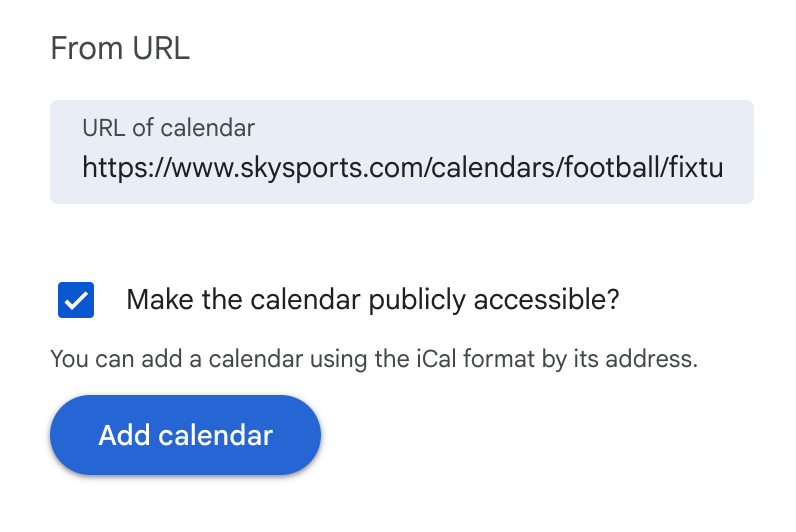
This will now populate all the fixtures into your Calendar! ⚽️ ⚽️ ⚽️ ⚽️ Going to be some late nights for us...

Come on, England! (Or insert your own team there 🤣).
You can learn more about Google Calendar with us.

Explore our Google Calendar Training Courses or get in touch with Jordan and Lauren today to book a custom training session for your team.
